
Business use cases
Start with a business problem, then build the dataset, review queue, or app your team needs to solve it. These 20 guides include synthetic CSV data, exact rules or AI instructions, output fields, and concrete acceptance checks.
AI guides propose labels or extracted fields for review. Rules-based guides include downloadable Python calculations and expected sample output. You can start with inline data, then replace it with your own connected sources once the result is correct.
Retail & commerce#
| Business problem | What you build |
|---|---|
| Classify retail products into a controlled taxonomy | Turn inconsistent supplier descriptions into proposed category codes that a merchandiser can review before publishing. |
| Extract product attributes for catalog enrichment | Give catalog editors a consistent set of material, color, and capacity proposals without overwriting the supplier description. |
| Prioritize replenishment by stock coverage | Give a buyer a sorted list of SKU/location pairs whose available stock will not cover lead time plus a buffer. |
| Find products selling below a margin floor | Give pricing teams a queue of negative-margin and below-target sales. |
| Find return-rate problems by product cohort | Identify products with unusually high return rates while keeping the denominator and observation window explicit. |
| Quarantine catalog records that fail publishing rules | Prepare a publishing-quality gate for required fields, allowed taxonomy codes, positive prices, and unique SKUs. |
Customer operations#
| Business problem | What you build |
|---|---|
| Route support tickets with AI suggestions | Prepare a reviewable ticket queue with a suggested team and urgency. |
| Turn customer feedback into a theme backlog | Convert free-text reviews into a small, stable set of product themes, then count themes without losing the original feedback. |
| Assign sales leads using explicit routing rules | Create a repeatable routing queue that a sales-operations owner can explain. |
| Build a renewal follow-up pipeline | Give account managers a time-bounded list of contracts approaching renewal, with an explicit owner and overdue status. |
| Flag accounts that need a customer-success check-in | Combine declining usage with unresolved support issues to create an explainable account review list. |
Finance#
| Business problem | What you build |
|---|---|
| Extract invoice fields into an accounts-payable review queue | Turn invoice text into proposed supplier, reference, date, currency, and total fields. |
| Reconcile invoices against allocated receipts | Find unpaid balances, overpayments, and receipts that reference no invoice. |
| Prioritize overdue receivables for collections | Give finance a ranked collections list with overdue balance and aging bucket. |
| Find duplicate suppliers without auto-merging records | Prepare candidate duplicate supplier groups using an explicit normalized tax identifier. |
Business operations#
| Business problem | What you build |
|---|---|
| Build a late-shipment escalation queue | Give fulfillment teams a deterministic list of shipments past their promised date, ordered by lateness. |
| Catch paid orders that have not been fulfilled | Find orders that are paid but still unshipped after an agreed elapsed-time threshold. |
| Audit campaign attribution before reporting conversions | Find missing campaign identifiers and repeated event IDs before a marketing report counts conversions. |
| Compare store performance against daily targets | Produce a store/day review table that distinguishes low sales attainment from low conversion. |
| Build a shift-handover queue from unresolved work | Give an incoming shift a sorted list of open work that is overdue, blocked, or missing an owner. |
Run a recipe#
- Choose a project. Use a project where you can create transforms, datasets, and optionally apps. Keep the recipe separate from a production destination for its first run.
- Load the example. Open Transforms, create a transform with the guide's name, and add Library → Seed. Use Paste CSV, then inspect the headers and values. Preserve identifiers as text. You can also upload the CSV under Files and read it with a File input.
- Configure the processing node. For a rules-based guide, add Script, select Python, declare the listed Output columns, and paste the supplied code. The script runtime must be available. For an AI guide, configure a provider, choose a chat model, and enter the exact instructions and output schema.
- Preview the complete fixture. Compare every known key with the guide's acceptance checks. AI Test on 3 rows is only a first check when the CSV has more than three records. A successful request is different from a correct classification.
- Create the destination. Under Datasets, create the named result dataset with the fields your output contains. Use text for identifiers, reasons, and statuses; Boolean for flags; and numeric types for counts and measurements. For calculated fields that use an empty string to mean unavailable, convert empty strings to null and define a nullable numeric field, or keep the entire field as text for the initial review table. Do not silently turn unavailable values into zero.
- Map and write. Add Output, select the dataset, and map all fields. For these complete sample snapshots, use the destination's replacement mode. Preview first, then save/run and inspect the destination's actual rows. Replacement is only appropriate when the input is the complete intended result. See Output modes.
- Give the team a screen. Use the dataset for inspection, or import approved results into a managed entity and bind it to an app. The Orders walkthrough demonstrates the entity-to-app pattern. Include the source key, reason, owner, and next action so a calculated exception becomes actionable work.
- Replace Seed with live inputs. Use Source, Dataset, or entity input nodes. Reconcile counts and totals again. Decide the refresh interval, rerun behavior, permissions, and reviewer ownership before scheduling the workflow.
Keep calculations and decisions distinct#
The date-based examples use 2026-11-10 or 2026-11-10T12:00:00Z to make expected results reproducible. Replace that reference time with an agreed reporting clock for operational use. Thresholds such as a 30% usage decline or an 8% return rate are example business policies, not WhoDB defaults.
The downloadable Python examples have fixture checks. That validates their calculations against the supplied CSV; it does not establish that your live source is complete or that your deployment's runtime is configured. AI acceptance tables are evaluation targets, not pre-recorded model output. The screenshots show real editor controls in the manual's synthetic workspace, and switch with the documentation theme.
These workflows prepare decisions and review queues. Sending customer messages, publishing catalog changes, paying invoices, or updating an external CRM requires an explicit app action, function, or integration with the appropriate permissions.
Start with retail taxonomy#
For an AI-based first project, follow Classify retail products. Then add attribute extraction and catalog quality checks. This gives you a practical path from messy supplier descriptions to a reviewed, structured catalog.
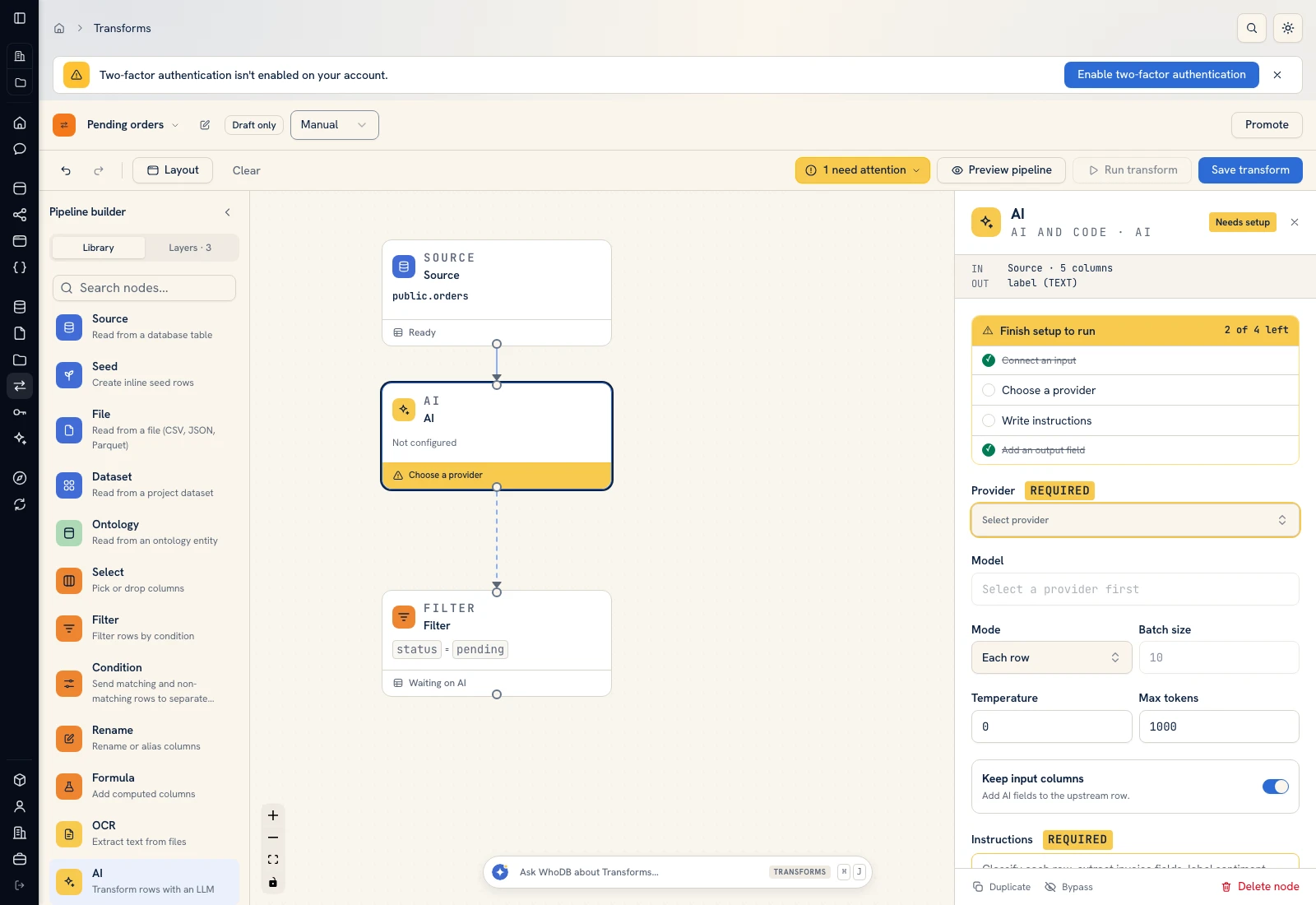 AI node controls used for classification, tagging, and extraction recipes.
 AI node controls used for classification, tagging, and extraction recipes.
Was this page helpful?